Webhooks
Webhook Notifications
Webhook notifications are now available for all of our Watch products, including Script Watch, Data Watch, Frame Watch and Policy Watch. It's easy to configure and can be configured per Watch product.
Enable Webhooks
Webhooks are enabled per watcher in the Config modal, opened from the Config button on each watcher's overview row.
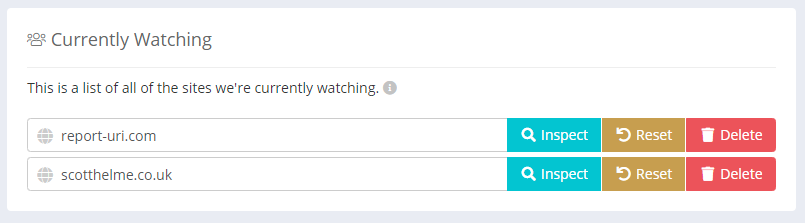
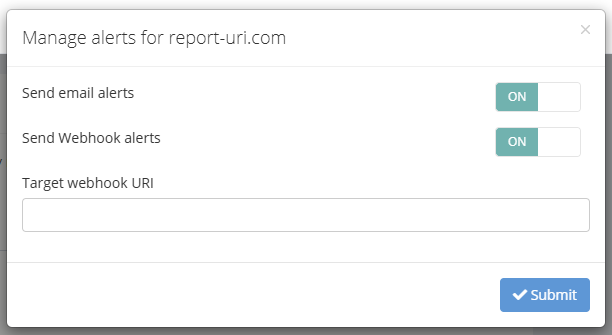
To send webhooks, enable the Send Webhook alerts toggle and set the Target webhook URI to the full URL where notifications should be delivered. Webhooks are available on Business plans and higher.
The Config modal carries other per-watcher alert settings too (alert threshold, email alerts, and product-specific options). For the full set, see the Config section on the Script Watch, Data Watch, Frame Watch, or Policy Watch page.
Webhook Content
Watch products send two categories of webhook event: detection alerts when a new observation is recorded, and silence alerts when a Policy Watch watcher stops receiving telemetry. Both arrive as HTTP POST requests with a JSON body.
Detection alerts
When a new observation is recorded for a watcher, the JSON body can contain the following values.
| Key | Value | When |
|---|---|---|
| text | Human readable text, used for audit trail | always |
| type | watcher identifier | always |
| monitored_domain | site being watched | always |
| first_seen | ISO 8601 timestamp of first report | always |
| policy | text of policy | policy watch |
| reportOnly | boolean | policy watch |
| resourceUri | observed URI | (script-data-frame) watch |
| detectedBy | How this item was observed; csp, csp_integrity, or integrity_policy | (script-data-frame) watch |
| ioc | true if the URI matched a threat intelligence indicator of compromise; false otherwise. Only meaningful on the Threat Intelligence plan — other plans always receive false. |
(script-data-frame) watch |
Here is an example payload.
{
  "text": "New Script Watch alert for report-uri.com : https://evil-cyber-hacker.com/malware.js",
  "type": "scriptWatch",
  "monitored_domain": "report-uri.com",
  "first_seen": "2026-01-07T13:37:00+00:00",
  "resourceUri": "https://evil-cyber-hacker.com/malware.js",
  "detectedBy": "csp",
  "ioc": true
}
Silence alerts
Policy Watch can also send an alert when a watcher that was previously receiving telemetry has gone quiet for longer than a configured threshold. Silence alerts are off by default and are enabled per watcher — see the Policy Watch page for details.
| Key | Value | When |
|---|---|---|
| text | Human readable text, used for audit trail | always |
| type | always policyWatch |
always |
| monitored_domain | site being watched | always |
| last_received | ISO 8601 timestamp of last received report | always |
| silence_threshold_days | configured silence threshold in days | always |
Here is an example payload.
{
  "text": "Policy Watch: No telemetry received for report-uri.com",
  "type": "policyWatch",
  "monitored_domain": "report-uri.com",
  "last_received": "2026-04-20T08:15:00+00:00",
  "silence_threshold_days": 7
}
Chat destinations
When the webhook endpoint is a Slack Incoming Webhook URL, we format the request as a Slack message rather than sending raw JSON.
Slack, Discord, Microsoft Teams, Google Chat and Mattermost each have a setup page under Notifications, including the per-destination details that are easy to get wrong - Discord needs a /slack suffix on its URL, and Teams needs a Workflow rather than a retired Microsoft 365 Connector.
Audit Trail Webhook
Available on Business and Enterprise plans, the Audit Trail webhook streams account security events to an endpoint of your choice — useful for ingesting audit logs into a SIEM or monitoring platform.
This webhook is separate from the Watch product webhooks above. For personal accounts it is configured from Account Settings, under the Audit Trail section. For team accounts it is configured from the Teams page, under the Team Audit Trail section — switch to the team first, then visit the Teams page.
Payload
When the endpoint URL is not a Slack URL, the HTTP POST request will contain a JSON object with the following fields.
| Key | Value |
|---|---|
| type | always auditTrail — identifies the source when multiple webhooks are in use |
| account | team name (for team accounts) or email address (for personal accounts) |
| event | audit trail event identifier (e.g. apiKeyCreated) |
| text | human-readable message, prefixed with the account name |
| loggedById | internal identifier of the actor who triggered the event |
| loggedByEmail | email address of the actor, or empty string if system-triggered |
| requestIp | IP address the event was triggered from, or empty string if unavailable |
| timestamp | ISO 8601 timestamp of the event |
Example payload:
{
  "type": "auditTrail",
  "account": "Acme Corp",
  "event": "apiKeyCreated",
  "text": "[Acme Corp] API key \"main\" created by jane@example.com",
  "loggedById": "abc123",
  "loggedByEmail": "jane@example.com",
  "requestIp": "203.0.113.7",
  "timestamp": "2026-04-14T14:32:00+00:00"
}
Slack Integration
When a Slack Incoming Webhook URL is provided, the payload is formatted as Slack Block Kit instead of structured JSON. Follow the steps on the Slack page to obtain a Webhook URL, then paste it into the Audit Trail webhook field in Account Settings (personal accounts) or the Teams page (team accounts).
Audit trail events will appear as structured Slack messages showing the account name, actor email, timestamp, and a summary of the event.
For streaming this feed into a SIEM or log platform instead, see Audit Trail.
Events
All audit trail events are forwarded to the webhook with the exception of webhook delivery attempts, which are excluded to prevent feedback loops.
When a webhook URL is configured or removed, a corresponding audit trail event is generated (auditTrailWebhookSet / auditTrailWebhookRemoved) — so the first message your endpoint receives confirms the feed is live, and the last message it receives before deactivation is the removal notice.
Start Monitoring with Report URI
Already using us? Open the relevant product from your Watch dashboard to configure its webhook, or set up the Audit Trail webhook on Settings.
New to Report URI? Your 30-day trial includes both Watch product webhooks and the Audit Trail webhook, along with every other feature; keeping them afterwards needs a Business plan or higher.